AIGreats
PRIVATE BY DESIGN · LOCAL DOCUMENT TOOL

Medical Certificate Generator

Fill in clinic, patient and clinician details. Choose a style, preview your document, download a PDF, email yourself a copy or print.

Clinical templates are prepared for clinician review and signature. Personal absence statements are also available.

  • 4 template styles
  • Live preview
  • PDF download
  • Email a copy*
  • Print

* Email requires sign-in and consent; sent only to your verified account email.

Prepare your document

Free download & print · No sign-up

Clinic details
Clinical details
Clinician details

Enter only information you are authorized to use. Entries remain in this page; refreshing clears them.

Direct PDF download, email attachment or browser printing — choose what works for you.

Live previewA4

Clinic / Hospital Name

Clinic address

Contact number

MEDICAL
CERTIFICATE

Date: [Date]

Patient: [Full name], age —, gender —.
Examination recorded on [Date].

DIAGNOSIS / CLINICAL OBSERVATIONS

No clinical observations entered.

RECOMMENDATION

No recommendation entered.
[Clinician name]

[Qualification]

Registration: —

Signature / clinic stamp
For clinician review and signature. Prepared with AI Greats.

How to use the medical certificate generator

  1. Choose a clinical template, a personal statement or an information draft.
  2. Enter the required details from your authorized information. Clinical observations and recommendations are entered by the user, not generated by AI.
  3. Review the preview, then download PDF, print, or sign in to email a copy.

Know which document you need

A template helps organize information. It cannot replace a clinical assessment or the recipient's own form.

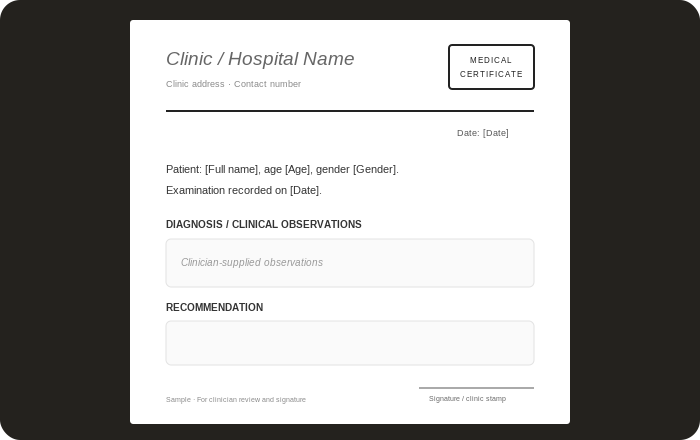
Medical certificate generator sample with clinic details, clinical sections and a blank signature area
Illustrative sample, not a signed medical certificate.

Medical certificate generator questions

Does this medical certificate generator issue a doctor's note?

No. It formats clinical information supplied by an authorized user into a document for clinician review and signature. Personal absence statements are also supported. It does not provide an examination or verify medical facts.

Is the tool free?

PDF download and printing are free and need no account or AI credits. Email delivery requires sign-in to a verified email and is limited to three sends per account per day.

Will my school or employer accept the document?

That depends on its policy and local requirements. Ask what evidence is required before using a template. If it requires a clinician-issued certificate, contact a qualified healthcare professional.

Are my details uploaded or saved?

Download and print are processed locally. Only if you choose email and consent, the PDF is sent through AI Greats and Resend to your verified email. AI Greats does not store its contents; mail providers retain messages under their policies. Optional analytics are excluded from this page.

Can I add a doctor signature, stamp or verification code?

Authorized users can enter their clinician and registration details. The signature / stamp area stays blank for the appropriate professional to complete; the tool does not generate signatures, stamps or verification codes.